 BeRoTracker
Pattern editor
Up to 256 channels, numbered in hexadecimal from 00. Transpose, vary, roll or amplify a selection, extend it to match the clipboard, or render a pattern to a sample.
BeRoTracker is a music tracker for Linux, Windows and macOS. It follows the keyboard-based workflow of Impulse Tracker, with sample editing, plugins, MIDI and OPL3 synthesis. Download the ZIP, extract it and run.
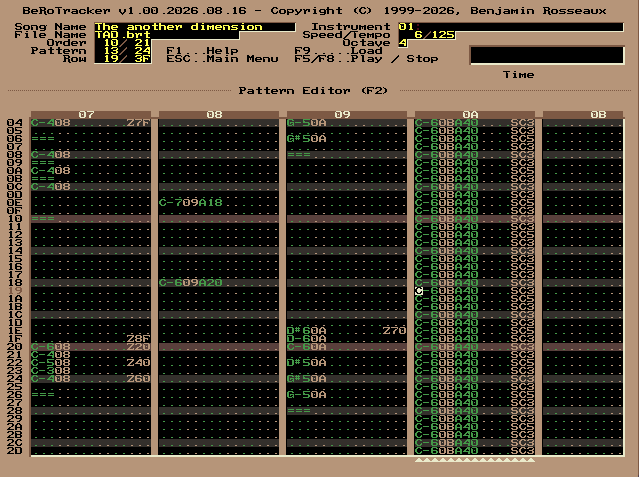
Enter notes in patterns and arrange them into a song. You can use samples, plugin instruments and OPL3 voices together, edit drums in separate patterns, and connect effects in the modular editor.
Up to 256 channels, numbered in hexadecimal from 00. Transpose, vary, roll or amplify a selection, extend it to match the clipboard, or render a pattern to a sample.
Patterns run down, channels across, one cell each. A cell can send its channel to a channel pattern, so one bassline is written once and read by every pattern that wants it. Shift + F11.
A separate editor for drum patterns, with drum instruments and its own order list. Press the pattern editor shortcut again to switch between the two editors.
Edit waveforms, apply effects, resample audio or generate samples with the built-in synthesizer. Instruments have note maps, jump points and envelopes with ADSR tools and tools to double or halve their length.
Connect amplifiers, a parametric EQ, built-in effects and individual FM voices in the modular editor. The EQ includes presets.
Supports VST2, VST3, CLAP and BeRoTracker's own BTP format. Plugin scan results are cached. Plugins can open their own editor windows, and their parameters can be automated.
Import and export MIDI files, assign MIDI controllers to automation columns, and send playback to external instruments through a MIDI output port.
Use OPL3 instruments alongside samples and save them in the BRT file. They support
^^^ and === just as samples do. The importer reads 42 AdLib
formats, including HSC, AdLib Tracker 2 and several game music formats, and
17 kinds of AdLib instrument file and instrument bank, from SBI and IBK to Doom's
GENMIDI. A song can be written back out as an AdLib RAW register capture.
The interface is drawn with Vulkan where the driver offers it, with OpenGL otherwise and with Metal on macOS, and scales with the window in every case. Choose a high-resolution font or the classic 8×8 font, and customise the 16-colour palette.
No installer needed. Extract the archive to a writable folder and start the program. Settings, caches and logs are stored alongside the executable.
A channel pattern is one column lifted out of a pattern and given a life of its own, which any number of patterns can then read. The trackers one has to pay for do this with an order list of their own, one per channel. Here it comes out of the pattern itself, so nothing is put beside the order list: the pattern stays the unit of the song, and a channel only says where its notes come from.
FFFF means no
channel pattern at all, the space bar repeats the row above, and Enter jumps to that
cell in the pattern editor.CPDA and CPMP, each with its length in front of it, which is
what every reader of this format has always stepped over when it met a block it did
not know. A song that uses no channel pattern writes neither block and comes out byte
for byte the way it did before this layer existed.The mixer supports 256 channels and several interpolation methods, from nearest neighbour to windowed SINC with up to 1024 taps.
Seven palettes are included, with Camouflage as the default. You can also load and save your own. Each palette has 16 colours.
Use BRT to save songs with all BeRoTracker features. You can also save as MOD, S3M, XM or IT, within the limits of each format.
Supported files can be loaded directly from ZIP archives, including nested
archives. To save a compressed module, use .zip or a compressed module
extension such as .xmz.
BeRoTracker imports 42 AdLib formats: tracker modules, sequenced music, OPL register captures and game music. They are converted to patterns and OPL3 instruments that you can edit and use alongside samples. Conversion has some limits, described below. Instrument files and banks of the same family are read as well, 17 kinds of them.
These formats already use patterns and order lists, which are imported into BeRoTracker's pattern editor.
A.H. signature. It shares
the CMF extension with the Creative Music File and is otherwise unrelated to it: a
99-position order list, 64-row patterns and six-byte events, played at 18.2 rows per
second divided by 1, 2 or 4. All 10 test files loaded, with all 18,610 note pitches
and all 8,323 drum events matching the reference, and all 10 were byte-identical on a
round trip.These formats store independent event sequences for each voice. The importer runs the sequences and writes the resulting notes into editable patterns.
insts.dat in the song directory.Captures contain timed writes to the OPL registers. The importer reconstructs notes, instruments, volume changes, pitch bends and rhythm-mode drums from those writes, then converts them to patterns. Timing changes are recorded in the pattern rows.
A song can also be written back out as a RAW capture. The export plays it through a mixer of its own and records every write that reaches the OPL3 chip, timed by the chip's own sample clock rather than by the mixer's blocks. The call rate is selectable from 50 to 2000 per second, with 1000 as the default, which is fine enough for the steps of a register macro as well as for ticks.
These formats store instruments and events interpreted by a playback driver. The importers reproduce the driver's behaviour and convert its OPL output into patterns. The resulting tracks follow chip voices, so their layout can differ from the source file's channels.
standard.bnk beside the song. All 247 test files loaded, with matching
note and drum pitches, and all 247 were byte-identical on a round trip.ADL signature, and the
older Lucasfilm format. Tested with 257 LucasArts and 27 Lucasfilm files.patch.003 beside the song. Tested
with 104 EGA files. VGA support is implemented but has no test files; only the first
subsong is played.The LucasArts, Lucasfilm and Sierra formats share an importer. All 388 test files loaded, with all 246,674 note pitches matching the reference, and all 388 were byte-identical on a round trip. Standard MIDI and CMF have separate importers.
XAD wraps music data in a shared header that identifies the player and stores the title, author and speed. All six player formats are supported.
.bmf files as well as BMF data inside XAD.Apart from the songs, BeRoTracker reads 17 kinds of AdLib instrument file and instrument bank. Every one of them holds the same thing, the eleven register bytes of one chip voice, once over for an instrument and many times over for a bank; what they differ in is the wrapping. Most name themselves with a signature, and the ones that carry none are told apart by their extension and their length, the way the trackers of that family tell them apart too. In the instrument browser a bank is walked into like a module, so single instruments can be picked out of it, while a single instrument file goes straight into a slot. Either way the list says which kind it found.
GENMIDI lump of a Doom
is.4OP in place of the
signature carries both operator pairs of one voice.AdLib song formats are import-only; the one way back out is the RAW register capture described above. Effects are mapped to BeRoTracker commands or instrument settings where possible. Unsupported commands are omitted, including HSC's two individual operator-level effects and some Boomtracker commands.
Playback can differ from the original. BeRoTracker uses period-based pitches, tick timing and Scream Tracker / Impulse Tracker effects for both samples and FM voices. Source tick rates are converted to tempo values with 16 bits of fractional precision, but slides and vibrato use BeRoTracker's own units. AdLib Tracker 2 has the most complete support: register macros, carrier-level volume and its original note table are preserved. Older formats use exact note pitches rather than that table's roughly 14.5-cent downward offset. Round-trip figures compare an imported song against the same song saved as BRT and loaded again, so a byte-identical result means the import survives being edited and stored. The test results above apply to the tested files; compatibility varies by format and song.
For formats without patterns, the importer chooses a row length that preserves note events while keeping the song within the 240-pattern limit. The tested id Software IMF files used four playback ticks per row without losing notes. If a voice is triggered twice within a single source tick, only the second trigger is kept.
--force-opengl skips that
check. If neither is available it reports an error at startup. On macOS it draws
through Metal and nothing else; there is no OpenGL there.libxkbcommon for keyboard input.~/Library/Application Support/BeRoTracker.The ZIP includes the Linux and Windows executables and the macOS application bundle, icons, a Linux desktop entry and EQ presets. Extract it to a writable folder.
BeRoTracker is free to download. If you find it useful, you can support its development at donate.rosseaux.com.
$ unzip BeRoTracker.zip
$ cd BeRoTracker
$ ./BeRoTracker

# Optional: install the icon and menu entry
$ ./install-desktop.sh
Extract the ZIP, then run
the Windows executable:

BeRoTracker\BeRoTracker.exe
$ unzip BeRoTracker.zip
$ xattr -dr com.apple.quarantine BeRoTracker
$ open BeRoTracker/BeRoTracker.app

# Before dragging the bundle elsewhere
$ cd BeRoTracker
$ ./BeRoTrackerMacOSPrepareDragDropInstallation
The macOS build is signed but not notarised, so
Gatekeeper stops the first start. Either take the quarantine mark off the extracted folder
as shown above, or right-click the bundle, choose Open and answer the question once. Out of
the archive BeRoTracker.app shares the palettes and EQ presets with the other
two builds, which lie beside it;
BeRoTrackerMacOSPrepareDragDropInstallation puts a set of both inside the
bundle so it can be moved anywhere, /Applications included, and takes nothing
out of the folder. BeRoTrackerMacOS starts the same program from a
terminal.